



Wärdshuset Spinnaren
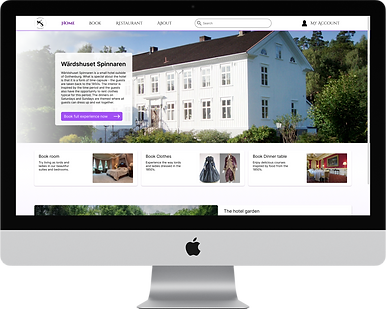
Project
To create a web site for a fictional hotel - Customer and management pages
Tools
Pen & paper, Figma
Role
In this project I worked alone on all parts
"Design a web site for the fictional hotel Wärdshuset Spinnaren. The design should include pages where users can book room, clothes, and dinner. It should also include pages where the staff can manage bookings."
Process
Meeting with client
Pen & paper sketching
Feedback from supervisor /client
Designing in Figma
Testing with users
Refining the design
Background
This project was part of the course "Graphical Interfaces" on the master's programme in Interaction design at Chalmers University of Technology. To make the task more similar to a real-life project we got to meet with a person acting as the client. This course was given the first year of the master's programme. However, I have chosen to make a redesign of it since my design and prototyping skills has improved a lot since then. The design I made is still based on the collected data and paper sketches that I made in the course.
Meeting with the client
The class met with the client where they explained what kind of product they wanted as well as the requirements they had. We also got to have a dialogue with the client to ask questions and clarify things that were ambiguous or needed more information.
The client wanted a design of the hotel website where customers should be able to book rooms, clothes, and dinner for the dates they wished to stay at the hotel. Furthermore, the client wanted a design of the staff's pages, where they could manage incoming bookings.
Sketching
Based on the information given by the client I made some sketches using pen and paper. I sketched various sugestions for the different pages that should be included.


Feedback on initial sketches
After I created the first sketches I discussed them with supervisors, who also apartly acted as the client and were thus able to give more information about the requirements. These discussions gave me insight in what was good and what needed to be changed to follow both the client's requirements and standards in graphical design. I then changed some parts of the sketches accordingly.
Prototyping in Figma
At this point my redesign started. I used the paper sketches to develop a mid-fi prtotype in Figma. First, I created the overall layout in grayscale, and then I iterated and transformed them into mid-fi prototypes with colour. Here, the focus was both on usablity and on design as I wanted to learn more efficient ways of working. I worked with components and created variants of these, and I also created some animations. Additionally, I focused on the visual aspect by choosing a colour scheme and creating a style guide including typefaces and icons. To be able to test the prototype in a realistic way, I created interactions in, as well as between, the different pages. These interactions included dropdown menus, sliders, spinners, top navigation, and buttons, to name a few.


Component library

Styleguide
Testing with users
To evaluate the design I chose to test it with some users. They received a set of tasks that were created to cover the different parts of the design. Both the customer and the management pages were tested in these tasks. During the test the users were asked to think aloud and comment on things they found complicated or hard to understand. I took notes on what they said and after the tests the users were also asked about their general thoughts and experience of using the website.
To evaluate the design I chose to test it with some users. They received a set of tasks that were created to cover the different parts of the design. Both the customer and the management pages were tested in these tasks. During the test the users were asked to think aloud and comment on things they found complicated or hard to understand. I took notes on what they said and after the tests the users were also asked about their general thoughts and experience of using the website.
Examples of tasks
Customer task: "You want to make a dinner reservation for your company. You are 4 adult and 2 children and you want to eat there at around 6 pm on April 8th."
Management task: "What bookings have been made for this month?"
Final design
Based on the input from the tests with users I made some changes to the design. I removed some features that the users found unnecessary and changed elements that were hard to understand. Additionally, I worked with colours and size to highlight some elements that were not noticed by the users at first glance. I used a layout of 12 columns as this is the web standard, and an 8-point grid system since this allows for consistency and scalability, and makes the spacing visually pleasing.
In the final design the customer can book rooms, clothes, and dinner separately, or they can book a package including all three types of booking. They can choose which dates they want their booking to cover, use filters to narrow their choice, and specify if they have certain requests. The customer can also find information in a FAQ list, as well as see the menu of the restaurant. Furthermore, assuming they are logged in, they can see their previous bookings and make changes to these. The staff can manage bookings in different ways, like sorting, confirming, or deleting. They can also see all rooms in the hotel and the status of these.


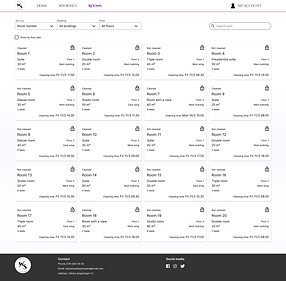

Preview of the website

Insights and learnings
More knowledge in Figma
During this project I focused on improving my skills and knowledge in Figma. I worked with components and their variants no learn a more efficient way of designing and to create prototypes that need less pages to show the same interactions.
Improving visuals
Another focus I had when making the redesign was to work with the aesthetics of the design. I therefore created some pages which had more room for this, such as the about page and the restaurant menu page. Including more visuals in these pages would not be a distraction for the user, compared to the main pages, as the former included less elements and required less focus from the user.


