

Project
To make a tangible product made of recycled material
Tools
Pen & paper, Arduino, recycled electronics, physical tools, Figma
Role
Researcher and designer, together with three other people
"Design an artifact that makes extensive use of recycled materials and/or parts, while still being suitable for mass production."
Process
Research
Ideating & Sketching
Prototyping & Formative evaluation
Ideating & prototyping
Building final product
Summative evaluation
Background
This project was part of the course "Tangible interaction" on the master's programme in Interaction design at Chalmers University of technology. The project lasted for 6 weeks and the theme of it was "sustainable interaction design". The whole group worked on the initial researching and ideating phases. Then the work was divided to focus on programming and physically building respectively. Here, I mostly worked on the physical building of the final product.
Researching
The first research was made to investigate what relations people have towards recycling and recycled materials. We conducted interviews to get participant´s subjective view on their recycling and their attitudes towards recycled materials. To complement this, we performed some contextual observations and guided tours. The participants showed interest in seeing what the recycled materials would turn out to be, and also commented on there being a trend in using recycled materials. However, there were some comments on the looks of it, and that it shouldn’t show that it is recycled because of its “homemade” feel of it.
Ideating and sketching
We ideated and sketched several solutions to visualize some basic ideas that could be the foundation of the product. After discussions and voting we selected one to continue with, based on the implementation possibilities and the scope of this project. The chosen idea was a remote controller that could control music, or lights, wirelessly.

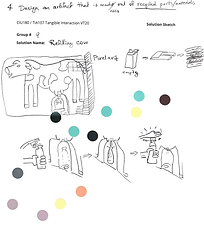

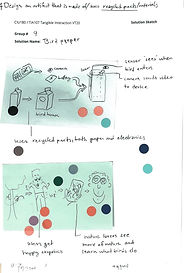


Solution sketches
Prototyping
To further explore what interaction possibilities the controller had, we made three prototypes; two for music and one for lights. They were made in three different sizes as this was something that we wanted to test – what size of the controller would be most appreciated by a potential user? The physical prototype also made it easier for us as designers to sketch on different kinds of interactions. As this was done some problems arose on how the interaction should really be implemented. Several ideas and suggestions were discussed, and in the end, we decided to try one of them in a focus group to get some comments and feedback from users.
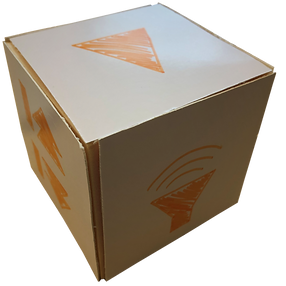

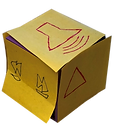
Evaluating
The results from the focus group showed that when considering the size of the controller the middle sized was the preferred one, as it would fit nicely in the hand. However, the participants found it hard to understand how they should interact with it. Another problem was that the different sides had different types of interaction, like turning clockwise and anti-clockwise for changing the volume, and flipping it to another side to skip a song. The participants clearly stated that this was confusing and that it would be much easier to interact with if all sides had the same kind of interaction. Lastly some concerns about accidental interaction was brought up, as the risk of making an erroneous input when interacting with it seemed quite high.
Ideating and prototyping
Based on the feedback from the focus group we ideated on how the problems that had been mentioned could be solved. We also decided to discard the light controller, to focus on making the music controller as good as possible. Different shapes of the controller were explored, as well as different sizes of those shapes. We also experimented with possible interactions for the different shapes, with the result of choosing a small triangular shape. This was based on its ease and convenience to interact with, as well as its size.
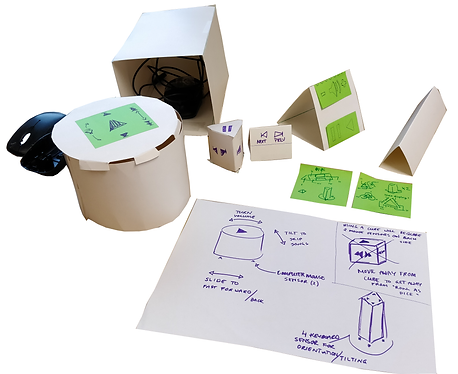
Building the final product
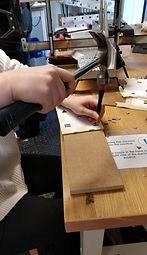
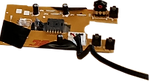
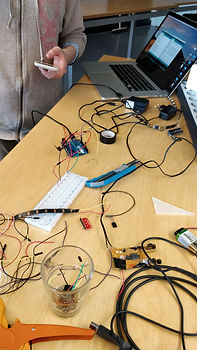
The process of building the final product consisted of two parts - programming the Arduino to connect the physical interactions to the product, and fabricating the casing and connecting the electronics.

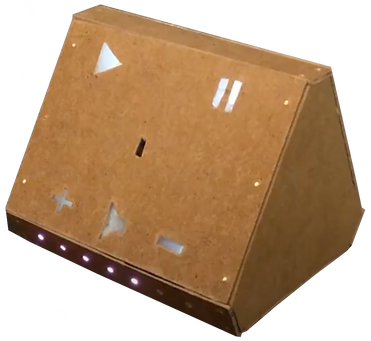
Repurposed wood was used for the casing.


LED-lights light up when the corresponding function is in use.
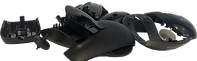
To make the controller sense its current direction and movements we decided to use the sensors from old computer mice.
Summative evaluation
During this evaluation we found that some participants did not understand the interactions at first, but once having figured it out some thought it was a fun way of interacting with it. Regarding its shape, the participants wanted it to be smaller, fitting better in ones hand.
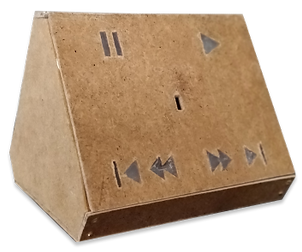
Current size
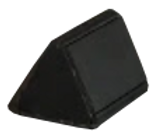
Intended size
How it works
With the prism control the user can control any kind of media. By sliding it horizontally the current function can be manipulated, and by flipping it the user can switch between different functions. The light provides feedback for which function can currently be manipulated, as well as the level of the volume.


Limitations
Because of limited access to components we used an Arduino as a microcontroller board. We could therefore not connect the mice sensors. To do that we would have needed a Raspberry Pi or something similar. Instead, we controlled the movement with an IMU, which senses the acceleration of the prototype.
Currently, the prototype is also not wireless since the components we used for the prototype didn’t allow for wireless connection to the computer. Thus, we needed to connect it to be able send signals that would represent a button pressed on the computer. The power supply was therefore the computer, but with a wireless solution the prototype would need a power bank inside.
Because of the limitation in components we also built the prototype in a larger size than the intended final product, to be able to fit everything inside. The size of the prototype makes it quite bulky and aesthetically strenuous as it takes up a lot of space and attention. This was also commented on in a summative research interview, where participants preferred the handling of a smaller sized rough prototype.
Insights and learnings
Use of material
We found that by using quite simple recycled and reused materials, it is possible to build a functioning and rather advanced product. By this we hope to inspire new inventions of how these kinds of materials can be used.
Switching idea is ok
Early on in our process we switched from our initial idea to a new one, realizing the first was too big for this project. If we had stuck with our first idea we might not have been able to produce a functioning product at all.