
Disgeyesed

Part of the Quantified self exhibition
Project
Collaboration with the master's program and Universeum
Tools
Figma, MetroRetro, HTML, JavaScript, Gazerecorder’s GazeCloudAPI, heatMap.js
Role
I was part of the design team, working on the interface
"Make natural science interesting and relevant for 12-16 year-old school children. Inspire them to learn more about science."
Process

Background
This project was a collaboration between Universeum, a science centre in Gothenburg, and the master's program in Interaction design at Chalmers University of technology. The purpose was to contribute to Digitala Universeum by designing a game or explorative exhibition in the topic of Quantified self. The term "Quantified self" means that the users should be able to explore science through tracking or measuring themselves.
Defining the general idea
The project started with deciding the main theme of the design. After some brainstorming sessions, literature research, and discussions with teachers and peers we chose eye tracking to be the main focus, teaching users how they processes information.
We then used the brainwriting method to ideate on which environment the eye tracking would take place in. This resulted in the idea of having users search for hidden information in some way. To visualize different examples of the environment we created several moodboards, and we also created a storyboard to visualize how the overarching interaction would look from start to finish.
Brainwriting

Storyboard

Sketching and evaluating
Three ideas regarding what should be hidden and where, were brought up during another brainstorming session: social media, Where's Waldo/Hidden folks, and Wikipedia article. To further develop the concepts for each idea we used the method Crazy eights. The most liked ideas were then sketched in Figma and evaluated by a user in the target group.
The evaluation showed that searching for information in a text environment, like a Wikipedia article, was not engaging for the target group and could therefore be discarded.


Figma sketches
Crazy eights
Concept development
When having conducted the evaluation we weighed the pros and cons of the two remaining ideas against each other, and concluded that social media has a more clear connection to reality than finding something in a cartoon-like environment. This was something that we considered important as the users should learn more about themselves and how they process information. By creating a morphological matrix we extracted three concepts.

Morphological matrix
Prototyping and evaluating
Two interactive prototypes were made: one with focus on finding stars in one picture, and the other with focus on finding a character in several pictures following each other.
We then tested the concepts remotely (due to Covid-19 restrictions) with users from the target group who got to think aloud while interacting with them. The goal of the evaluation was to find out which concept the participants liked the most and why, as well as if they preferred to see the result of their eye movements on a fixation map or a heat map.


Heat map & Fixation map
Analyzing the results
In order to compile and categorize the feedback received during the evaluation with users we conducted a KJ analysis. This showed us that the concept of finding stars in one picture was most preferred. During the tests we also found that no one read the short introductory story, and that some participants zoomed in on the screen to make it easier to find the objects.
Based on this we made some changes to the design. To make the users more interested in reading the instructions, the story was expanded and complemented with pictures. The code was also changed so that no zooming was allowed. This was also the stage in which the actual eye tracking was implemented into the design. Both the fixation map and the heat map was preferred by different users. However, we chose to use the heat map as this was supported by the software we chose to work with.
Implementation and testing
As the final design changes were made, the real code was also implemented. This consisted mostly of translating the design to a web page, using HTML. The game logic itself consisted of JavaScript. The implementation also used GazeRecorder’s Gaze-Cloud API and heatMap.js in order to track the users’ eyes and later display the result as a heat map.
The final concept was also tested during the exhibition, where players stated that it was fun and somewhat frustrating when they had trouble with finding the last star, which was intended to not make the game too easy. They also expressed excitement when they saw their name at the top part of the high score list. One visitor also thought that the context of social media was a clever way of connecting the game to reality.
Final concept
The game starts with meeting a dog named Bruno, telling the player that Mr Pixel has stolen his stars and hidden them somewhere. The player is then asked to help Bruno find his stars. In the game the player has to search for stars hidden in an environment inspired by social media. When all stars have been found the player is presented with a heat map showing where on the screen they looked the most, as well as some facts about attention grabbing elements. The goal is to make teens more aware of what draws their attention when they use social media and that they might start to reflect on why things look as they do on these platforms.

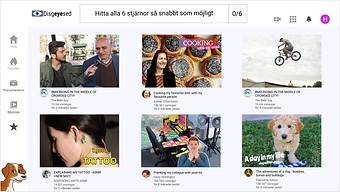
Click on the image to play the game (opens in a new window)

Insights and learnings
Believe in your team
During the project, time was continuously a struggle as we felt that we might not be able to implement the concept in time for the deadline of the course. But by dividing up the work in the team and working systematically, we managed to present a functional concept.
Providing a (sub)goal is beneficial
The users were provided with the goal of finding 6 stars, motivating them to finish the game. Seeing your progress (3/6 stars found) could contribute to this motivation even more. During the user tests the participants were eager to find the stars, not giving up before finding them all. The participants testing the game at the exhibition also showed excitement when ending up on the top part of the scoreboard.
Balancing the difficulty level
It was hard to set the right difficulty level of the game. The stars should not be too easy to find since that could make the game boring, but if they are too hard to find, there is a risk of the users being too frustrated and giving up. Based on the tests we conducted, we found the level to be quite accurate, but this is something that we would need to test further.